Moving between machines is always difficult. If you keep files on your hard drive, problems arise with forgetting files. So, if you copy them to a USB drive, you can end up with two copies to a file, which can be even worse.
One way to combat this is to use an online storage solution, such as Microsoft's SkyDrive. SkyDrive is basically an online USB drive, with access to Microsoft's Office Web Apps. Google has a similar functionality through Google Docs.
However, if you are looking for something that doesn't require an online account, you can also download a tool such as Microsoft SyncToy. This application is free for Windows users, but for whatever reason not installed with Windows when you first install it. If you are someone who has some issues with keeping track of files, this is a highly customizable tool. As opposed to a program like backup, a synchronization program can be set up to work both ways. In other words, if I change a file on my hard drive, it can be synchronized to my USB drive, and if I change a file on my USB drive, it can be synchronized to my hard drive.
For free, it's a great little tool, and a good alternative to accidentally overwriting a file with an older version.
Download SyncToy here
Showing posts with label CoolSoftware. Show all posts
Showing posts with label CoolSoftware. Show all posts
Saturday, October 29, 2011


Friday, September 23, 2011
Windows 7 and the curse of retraining
As a computer person, I am in the position where I need to constantly retrain myself. Many of the things I learned in college are already obsolete. A career in computers always presents new challenges and new opportunities, and that is part of what I like about it.
I find that many people hate the fact that things change. Computerization of jobs is one thing. I know two doctors with small offices who are pretty computer illiterate. They both plan on retiring if and when they have to submit all medical claims electronically instead of faxing or mailing them. I certainly can understand that. In that situation they feel there is too much added expense (in time and/or money) in retraining themselves, buying equipment, and possibly hiring an assistant to do the computer work.
However, even computer literate users generally dislike retraining. I understand the thought. People who are not in the computer field seem to look at computers as an appliance, much like a stove. If I had to retrain myself on how to use a stove every year I'd dislike that and just order out more.
Since people don't like the idea of retraining, they tend to use a new tool the way they used the old tool. However, newer versions of tools generally include better ways to do things. For example, since Windows 95, I used the same process to take a picture of what is on my screen and save it. I would hit the print screen button on my keyboard (or hit alt+printscreen to only capture the current window). If I wanted to only keep a part of the image instead of the whole thing, I would then open a program like Photoshop, create a new file, paste the screen image, select the part I want, crop it down, and save. This process is clunky, but it works, and this was just how I did things. Windows 7 (and some versions of Vista) include a tool called the Snipping Tool. This tool would let me take an image of part of my screen in many less steps. Were I not constantly playing around with new features, I would be less efficient. For those of you who haven't started using this cool tool, here is the Microsoft Snipping Tool tutorial.
Rather than learn new versions of a tool, people may even actively seek ways to make the new tool look like the old tool. For example, when Office 2007 came out, people hated the Ribbon interface, which replaced the old menu interface. A number of companies released tools (such as ubitmenu) that allowed users to display the old menus back in Office 2007.
For me, retraining is part of the allure of computers, but if you are among those who view it as a curse, I can understand the thought.
I find that many people hate the fact that things change. Computerization of jobs is one thing. I know two doctors with small offices who are pretty computer illiterate. They both plan on retiring if and when they have to submit all medical claims electronically instead of faxing or mailing them. I certainly can understand that. In that situation they feel there is too much added expense (in time and/or money) in retraining themselves, buying equipment, and possibly hiring an assistant to do the computer work.
However, even computer literate users generally dislike retraining. I understand the thought. People who are not in the computer field seem to look at computers as an appliance, much like a stove. If I had to retrain myself on how to use a stove every year I'd dislike that and just order out more.
Since people don't like the idea of retraining, they tend to use a new tool the way they used the old tool. However, newer versions of tools generally include better ways to do things. For example, since Windows 95, I used the same process to take a picture of what is on my screen and save it. I would hit the print screen button on my keyboard (or hit alt+printscreen to only capture the current window). If I wanted to only keep a part of the image instead of the whole thing, I would then open a program like Photoshop, create a new file, paste the screen image, select the part I want, crop it down, and save. This process is clunky, but it works, and this was just how I did things. Windows 7 (and some versions of Vista) include a tool called the Snipping Tool. This tool would let me take an image of part of my screen in many less steps. Were I not constantly playing around with new features, I would be less efficient. For those of you who haven't started using this cool tool, here is the Microsoft Snipping Tool tutorial.
Rather than learn new versions of a tool, people may even actively seek ways to make the new tool look like the old tool. For example, when Office 2007 came out, people hated the Ribbon interface, which replaced the old menu interface. A number of companies released tools (such as ubitmenu) that allowed users to display the old menus back in Office 2007.
For me, retraining is part of the allure of computers, but if you are among those who view it as a curse, I can understand the thought.
Wednesday, April 27, 2011
Cool Tools: Tunatic
I found a bunch of old CDs the other day, with hundreds of songs on them. These were CDs I had burned in 2000, 2001, and 2002. There were a number of songs I remembered, but I could not remember the name for them. I figured there had to be a tool out there to help me find the names (because iTunes imported all the files with the names Track1, Track2, etc).
I did a quick search and found a tool called Tunatic. This is a pretty nice tool that works much like the iPhone tools Shazam and Midomi. You let the computer hear the song, and the tool will identify it. It's a free tool, so I downloaded it and gave it a shot.
This worked extremely well for me. It had a little problem with some of my more obscure songs, especially anything without vocals. Since I have a computer headset with a microphone, it was extremely easy to set this up.
I'd recommend this, as long as you have some sort of microphone input.
Link to Download
I did a quick search and found a tool called Tunatic. This is a pretty nice tool that works much like the iPhone tools Shazam and Midomi. You let the computer hear the song, and the tool will identify it. It's a free tool, so I downloaded it and gave it a shot.
This worked extremely well for me. It had a little problem with some of my more obscure songs, especially anything without vocals. Since I have a computer headset with a microphone, it was extremely easy to set this up.
I'd recommend this, as long as you have some sort of microphone input.
Link to Download
Tuesday, November 30, 2010
Proper Hardware Disposal
In one of my classes last week, we discussed the proper way to get rid of old computer hardware, to avoid privacy issues.
I've gotten rid of old computers, but I generally either keep the hard drives (to destroy) or use software to do a thorough wipe of the drive's data When I say "thorough wipe", I am not talking about deleting files, because data can easily be recovered from a hard drive, EVEN AFTER YOU DELETE IT. Really. As a matter of fact, Microsoft's pre-Windows operating system, DOS, used to include an undelete tool which could recover deleted files easily.
eBay is one place people can purchase used hard drives, and they even provide information on why you need to thoroughly wipe a hard drive before you sell it. You can see that the site shows that social security numbers, credit card numbers, and all sorts of stuff can be found on these hard drives. This means your identity can be stolen even if you do nothing wrong, if a company you have purchased from does not follow good procedures for hard drive disposal. Aside from eBay, there are sites like Craigslist where people get rid of old hardware, and there are always garage sales. In the corporate environment, many colleges and companies pay companies to dispose of old hardware (such as eRevival locally). If you go with a cut-rate company, you may find that though they promise to clean hard drives, they may not do so thoroughly. Any of these are ways that data can be leaked if the hard drives are not wiped.
One way you can provide a level of security is to physically destroy the hard drive, though someone could pick it out of the trash and recover something. The best way is to do a full wipe of the hard drive, or what we used to call a "zeroize" at the company I used to work for. We were putting defense systems in military crafts, and one of the requirements was that the pilot needed to have a button to wipe all the data in the system, to prevent classified data from falling in to the enemy's hands. (Yes, that information is public.)
The Department of Defense has pretty high standards for data wiping, and there are a number of tools that meet their standards. The problem is most of these tools cost money. The one that I recommend is a free tool called Darik's Boot and Nuke (available for download at www.dban.org). Despite the informal name, it is a legitimate program (referenced by CNN and the BBC). There are commercial tools that do this sort of thing as well, but the major difference is not function, it is speed (DBAN has a reputation for being slow - the BBC article says it took two hours for an 80GB drive). DBAN is cool because it gives you a CD to boot off of, and you select the depth of the wipe you want. The more depth you want, the longer it will take to run. If you are going to do this, I would recommend choosing the most in-depth wipe, doing it before you go to bed (as a home user) or before you leave work in the evening (at work), and just letting it run overnight. That way, there is no time wasted waiting for wipe to be completed. In a professional environment, having a DBAN CD around is not a bad thing, especially so your company does not end up in violation with the standards that govern your industry (Sarbanes-Oxley, HIPAA, FACTA, etc.).
A larger company may want to invest in faster, packaged software for this, or a hard drive sanitizer (such as this one - though I am certain their claim of 7 minutes per drive is for the simple wipe and not the seven-pass version).
Any of these options are better than the ol' sledgehammer method, because who wants to clean up that mess?
I've gotten rid of old computers, but I generally either keep the hard drives (to destroy) or use software to do a thorough wipe of the drive's data When I say "thorough wipe", I am not talking about deleting files, because data can easily be recovered from a hard drive, EVEN AFTER YOU DELETE IT. Really. As a matter of fact, Microsoft's pre-Windows operating system, DOS, used to include an undelete tool which could recover deleted files easily.
eBay is one place people can purchase used hard drives, and they even provide information on why you need to thoroughly wipe a hard drive before you sell it. You can see that the site shows that social security numbers, credit card numbers, and all sorts of stuff can be found on these hard drives. This means your identity can be stolen even if you do nothing wrong, if a company you have purchased from does not follow good procedures for hard drive disposal. Aside from eBay, there are sites like Craigslist where people get rid of old hardware, and there are always garage sales. In the corporate environment, many colleges and companies pay companies to dispose of old hardware (such as eRevival locally). If you go with a cut-rate company, you may find that though they promise to clean hard drives, they may not do so thoroughly. Any of these are ways that data can be leaked if the hard drives are not wiped.
One way you can provide a level of security is to physically destroy the hard drive, though someone could pick it out of the trash and recover something. The best way is to do a full wipe of the hard drive, or what we used to call a "zeroize" at the company I used to work for. We were putting defense systems in military crafts, and one of the requirements was that the pilot needed to have a button to wipe all the data in the system, to prevent classified data from falling in to the enemy's hands. (Yes, that information is public.)
The Department of Defense has pretty high standards for data wiping, and there are a number of tools that meet their standards. The problem is most of these tools cost money. The one that I recommend is a free tool called Darik's Boot and Nuke (available for download at www.dban.org). Despite the informal name, it is a legitimate program (referenced by CNN and the BBC). There are commercial tools that do this sort of thing as well, but the major difference is not function, it is speed (DBAN has a reputation for being slow - the BBC article says it took two hours for an 80GB drive). DBAN is cool because it gives you a CD to boot off of, and you select the depth of the wipe you want. The more depth you want, the longer it will take to run. If you are going to do this, I would recommend choosing the most in-depth wipe, doing it before you go to bed (as a home user) or before you leave work in the evening (at work), and just letting it run overnight. That way, there is no time wasted waiting for wipe to be completed. In a professional environment, having a DBAN CD around is not a bad thing, especially so your company does not end up in violation with the standards that govern your industry (Sarbanes-Oxley, HIPAA, FACTA, etc.).
A larger company may want to invest in faster, packaged software for this, or a hard drive sanitizer (such as this one - though I am certain their claim of 7 minutes per drive is for the simple wipe and not the seven-pass version).
Any of these options are better than the ol' sledgehammer method, because who wants to clean up that mess?
Monday, March 22, 2010
Cat-proof your computer
So, I ran across this site today and, it's interesting to say the least. You can buy software to cat-proof your computer. Really, for those cat owners out there, is this a problem worth software for?
I think my favorite feature is the one that detects cat-like activity, and plays a sound that annoys cats to chase it off of your keyboard.
This is not a joke, from what I can tell:
http://www.bitboost.com/pawsense/
I think my favorite feature is the one that detects cat-like activity, and plays a sound that annoys cats to chase it off of your keyboard.
This is not a joke, from what I can tell:
http://www.bitboost.com/pawsense/
Friday, November 27, 2009
Magical Jelly Bean Product Key Finder
I am preparing to upgrade to Windows 7 at home, and I am a little leery of it, because if the upgrade doesn't go well, I may end up reinstalling certain software, such as Office 2007. There is a free program called Magical Jelly Bean Key Finder which will find the product keys for many of the Microsoft tools. For example, if I needed to reinstall Vista or Office, I wouldn't have to go find my original product keys. I could just use this program to get that information now. It will also allow me to save or print them automatically. It's a random little tool, but definitely something that I am going to use before I do my upgrade, and it's a free piece of software, which is nice.
Link to download
Link to download
Sunday, November 08, 2009
Free RAM Analysis Tool
I always seem to walk out of other people's classrooms learning something.
I observed one of our part-time faculty a few weeks ago (this is part of my responsibility as a faculty member), and she gave an example that I plan on using in the future.
One thing I always have trouble explaining to students is what type of RAM they need. The best answer I've been able to give is to consult the manufacturer's Web site, which is admittedly a pain in the rear end.
Crucial (a company that makes RAM) has made available for free a memory scanner. This program will tell you how much RAM you have, along with how many slots you have available. If you were considering a RAM upgrade, this is vital information, and this tool saves you having to open up the PC.
www.crucial.com/systemscanner/
I observed one of our part-time faculty a few weeks ago (this is part of my responsibility as a faculty member), and she gave an example that I plan on using in the future.
One thing I always have trouble explaining to students is what type of RAM they need. The best answer I've been able to give is to consult the manufacturer's Web site, which is admittedly a pain in the rear end.
Crucial (a company that makes RAM) has made available for free a memory scanner. This program will tell you how much RAM you have, along with how many slots you have available. If you were considering a RAM upgrade, this is vital information, and this tool saves you having to open up the PC.
www.crucial.com/systemscanner/
Thursday, October 15, 2009
Stumbling upon new sites
In my CIS 101 class today, we discussed (among other things) add-ons, and I demonstrated one called StumbleUpon.
As a computer person, I love this.
Basically, StumbleUpon allows you to download an add-on for your Web browser. You select some of your interests, and you can "stumble" upon sites that you like. You can select whether you like a site or dislike it, and based on what your interests are and what sites you like, you will be able to stumble to sites that other people with similar interests like. The more sites you rank, the more accurate it becomes.
This is fascinating to me because on some level this makes use of a technique called "data mining" - basically, how we can use a computer and some data to make predictions better than any person can do by hand. This is similar in some ways to "wisdom of the crowd" - where if you ask a hundred people who are going to win a football game, the collective opinion of the crowd would tend to be correct.
As with many things I mention here, this is a free Add-on!
As a computer person, I love this.
Basically, StumbleUpon allows you to download an add-on for your Web browser. You select some of your interests, and you can "stumble" upon sites that you like. You can select whether you like a site or dislike it, and based on what your interests are and what sites you like, you will be able to stumble to sites that other people with similar interests like. The more sites you rank, the more accurate it becomes.
This is fascinating to me because on some level this makes use of a technique called "data mining" - basically, how we can use a computer and some data to make predictions better than any person can do by hand. This is similar in some ways to "wisdom of the crowd" - where if you ask a hundred people who are going to win a football game, the collective opinion of the crowd would tend to be correct.
As with many things I mention here, this is a free Add-on!
- stumbleupon.com (Click on "Get the Add-On")
Monday, August 17, 2009
Registry Cleaning
In my CIS 101 class, there is usually some sort of discussion of how programs get installed. Many times, whether in class or after class, I get a question that goes along these lines:
"Can I just copy the folder where Microsoft Office is to another computer?"
Now, back in the Microsoft DOS days, that would typically work, but Windows made it a little more complicated. There are a few things that are done during the installation process that you don't see. For example, some files are put in other folders on the hard drive, typically a subfolder under your Windows folder. In addition, some "services" are installed, and some information is written to a location called "the registry". So, with all that in mind, the operating system was designed to include an installation process, in part to make software piracy more difficult. Not all programs take advantage of this, but many do.
The problem with this is that when stuff is written to the registry, it doesn't always get cleaned out well when programs are uninstalled, etc. This leads to your registry being slower, as it is filled with junk that slows down your machine. A lot of people wonder why they can just reinstall the Windows operating system and see substantial improvements in speed. Part of the reason is the registry.
However, there are ways to fix this, and there is one program that does this for free, Eusing Free Registry Cleaner. This program will go through and clean up the mess left behind by sloppy uninstall programs. Definitely worth a download and a run. This is something I typically run every few months or so, and it always finds a bunch of errors it can fix. This is a program that I would recommend, especially with it being free and all. The one concern I have is the limited support for Vista and Windows 7.
Link to Download
"Can I just copy the folder where Microsoft Office is to another computer?"
Now, back in the Microsoft DOS days, that would typically work, but Windows made it a little more complicated. There are a few things that are done during the installation process that you don't see. For example, some files are put in other folders on the hard drive, typically a subfolder under your Windows folder. In addition, some "services" are installed, and some information is written to a location called "the registry". So, with all that in mind, the operating system was designed to include an installation process, in part to make software piracy more difficult. Not all programs take advantage of this, but many do.
The problem with this is that when stuff is written to the registry, it doesn't always get cleaned out well when programs are uninstalled, etc. This leads to your registry being slower, as it is filled with junk that slows down your machine. A lot of people wonder why they can just reinstall the Windows operating system and see substantial improvements in speed. Part of the reason is the registry.
However, there are ways to fix this, and there is one program that does this for free, Eusing Free Registry Cleaner. This program will go through and clean up the mess left behind by sloppy uninstall programs. Definitely worth a download and a run. This is something I typically run every few months or so, and it always finds a bunch of errors it can fix. This is a program that I would recommend, especially with it being free and all. The one concern I have is the limited support for Vista and Windows 7.
Link to Download
Monday, February 09, 2009
Linux and Continental
This weekend, a good friend of mine got married in Florida. I flew down on a Continental flight, and they've upgraded their aircrafts to have little computer based systems that include free music, TV shows, movies, and games on demand (note: this may only apply to certain continental crafts). That's pretty cool by itself. However, being a computer person, I was curious about how it was done, and when I flew back, I was among the first people seated. I got to see them rebooting the system, and to my surprise, it was a Linux based program.
I did a little search and it turns out this is more common than I realized. The Linux-based in-flight entertainment systems are pretty common and have been replacing the phones that no one ever seemed to use on the planes.
Definitely an upgrade, and a few games of Sudoku and an episode of Fringe made the flight go very quickly!
Link to story
I did a little search and it turns out this is more common than I realized. The Linux-based in-flight entertainment systems are pretty common and have been replacing the phones that no one ever seemed to use on the planes.
Definitely an upgrade, and a few games of Sudoku and an episode of Fringe made the flight go very quickly!
Link to story
Monday, February 02, 2009
Do aliens exist?
Do aliens exist? I don't know the answer to that, but I certainly am open to the idea.
One of the ways that people have tried to find proof of alien life is by monitoring and analyzing radio waves from space. The problem is this - there is so much information that needs to be analyzed! If someone had millions of dollars to put in to computer systems to process data, that would be one solution. However, if you don't have the money to do so, there are other solutions. SETI@Home is one of those projects. This project started back in the late 1990's. You download a program, and it runs when you are not using your computer. You basically download the program, and your computer processes radio signals and sends the data back to the main computer. If your computer is on, this is a way to have it give back to the world.
If nothing else, your computer might find evidence of extraterrestrial life!
This is a nice example of distributed computing. Instead of one very powerful computer, you get smaller ones, and split the workload.
Web Link:
One of the ways that people have tried to find proof of alien life is by monitoring and analyzing radio waves from space. The problem is this - there is so much information that needs to be analyzed! If someone had millions of dollars to put in to computer systems to process data, that would be one solution. However, if you don't have the money to do so, there are other solutions. SETI@Home is one of those projects. This project started back in the late 1990's. You download a program, and it runs when you are not using your computer. You basically download the program, and your computer processes radio signals and sends the data back to the main computer. If your computer is on, this is a way to have it give back to the world.
If nothing else, your computer might find evidence of extraterrestrial life!
This is a nice example of distributed computing. Instead of one very powerful computer, you get smaller ones, and split the workload.
Web Link:
Thursday, January 22, 2009
Opening Office 2007 files in older Office versions
I posted this last semester, but this seems to be worth a re-post.
PCCC has made it the "standard" that we are using Office 2007. This presents some issues that we haven't seen in years, the issue of backwards compatibility. In other words, let's say you are running Office 2003 at home. If I mail you a Microsoft Word document in Office 2007 format, you are basically out of luck.
...that is, without an extra piece of free software from Microsoft.
If you are running Office 2000, Office XP, or Office 2003, and can not open Office 2007 files (they have slightly different extensions, such as .docx, .xlsx, or .pptx), the free Microsoft Office Compatibility Pack program will allow you to open these files.
I would highly recommend that you download this and install it, especially if you are a PCCC student. If you do classwork on campus computers, you'd have to otherwise remember to "Save as" an older format in order to work seamlessly between campus and home, and that's really not all that seamless, is it?
PC Users: Download Microsoft Office Compatibility Pack
One problem that someone verbally asked me about - this does NOT help with Access files. If you have Access 2003 and someone sends you a database in Access 2007 format, you're out out luck, even after installing this.
Now, why they haven't pushed this out as part of their Microsoft Update, I can not tell you.
Mac users only
If you are a Office for Macintosh 2004 or Office for Macintosh X user, you will need to go through a different process. You need to download a free tool called "Open XML File Format Converter for Mac 1.0". Yeah, that's easy to figure out.
Macintosh Users Download Here
PCCC has made it the "standard" that we are using Office 2007. This presents some issues that we haven't seen in years, the issue of backwards compatibility. In other words, let's say you are running Office 2003 at home. If I mail you a Microsoft Word document in Office 2007 format, you are basically out of luck.
...that is, without an extra piece of free software from Microsoft.
If you are running Office 2000, Office XP, or Office 2003, and can not open Office 2007 files (they have slightly different extensions, such as .docx, .xlsx, or .pptx), the free Microsoft Office Compatibility Pack program will allow you to open these files.
I would highly recommend that you download this and install it, especially if you are a PCCC student. If you do classwork on campus computers, you'd have to otherwise remember to "Save as" an older format in order to work seamlessly between campus and home, and that's really not all that seamless, is it?
PC Users: Download Microsoft Office Compatibility Pack
One problem that someone verbally asked me about - this does NOT help with Access files. If you have Access 2003 and someone sends you a database in Access 2007 format, you're out out luck, even after installing this.
Now, why they haven't pushed this out as part of their Microsoft Update, I can not tell you.
Mac users only
If you are a Office for Macintosh 2004 or Office for Macintosh X user, you will need to go through a different process. You need to download a free tool called "Open XML File Format Converter for Mac 1.0". Yeah, that's easy to figure out.
Macintosh Users Download Here
Tuesday, September 30, 2008
COFEE or tea?
A few months back, Microsoft introduced a USB drive called COFEE - Computer Online Forensics Evidence Extractor. The USB drive is loaded with all sorts of forensics tools that are "freely available". This set of tools is supposed to make extraction of forensic evidence easier on a PC.
Computer forensics is basically extracting evidence from a computer that may have been involved in a crime. It could be as simple as extracting evidence without giving a criminal a chance to say you planted evidence on the computer, or as complex as cracking passwords.
Now, supposedly, this USB drive is simply a combination of freely available software programs at the moment, but what gets to be a little scary is this - Microsoft wants to work with the law enforcement officials around the world, and they know what loopholes exist in their system. What's to prevent them from having some sort of backdoor installed to let law enforcement officials gain access to a criminal computer? Since Microsoft is basically a monopoly, it's hard to say.
It's great that they are working with law enforcement; what scares me is that whatever police can do, hackers will eventually do too.
http://news.cnet.com/8301-10789_3-9932600-57.html
Computer forensics is basically extracting evidence from a computer that may have been involved in a crime. It could be as simple as extracting evidence without giving a criminal a chance to say you planted evidence on the computer, or as complex as cracking passwords.
Now, supposedly, this USB drive is simply a combination of freely available software programs at the moment, but what gets to be a little scary is this - Microsoft wants to work with the law enforcement officials around the world, and they know what loopholes exist in their system. What's to prevent them from having some sort of backdoor installed to let law enforcement officials gain access to a criminal computer? Since Microsoft is basically a monopoly, it's hard to say.
It's great that they are working with law enforcement; what scares me is that whatever police can do, hackers will eventually do too.
http://news.cnet.com/8301-10789_3-9932600-57.html
Friday, September 19, 2008
Internal Temperature for your PC
In a CIS 101 course the other day, the question came up about the fans inside the system unit/tower. The fans are there to cool your system, so if they aren't running, it may be indicative of a problem.
When it is not a problem? Well, some fans are designed to be "green" - so in other words, they may shut off once in a while if they are not needed, in order to save you power.
 CPU fan not in action.
But, how can you tell if this is the issue or not? The Windows operating system does not come with any built in utilities to tell you if there is a problem or not. One of the nice utilities to check on things is a free software program called SpeedFan.
SpeedFan will let you (on a basic level) check temperatures inside your computer, and (on a more advanced level) view some of the diagnostic readings from the hard drive and even turn your fans on more or less often.
I don't recommend that option for beginning users.
Anyway, this free software can access lots of different pieces of information. I have two hard drives, and it was able to tell me that the temperatures were 36 degrees Celsius in one, and 48 degrees Celsius in another. A little Web research told me that these are well within acceptable ranges, so my computer is okay. Note that if you start seeing numbers like 60 degrees Celsius, this is a bad thing.
So, if you are wondering how hot it is inside your PC, this is one utility that you can download and use to check it. If you're someone who is looking for a good diagnostic tool to use on other people's machines, this is a good example of a free software program to have in your diagnostic kit.
Web Link:
http://www.almico.com/speedfan.php
When it is not a problem? Well, some fans are designed to be "green" - so in other words, they may shut off once in a while if they are not needed, in order to save you power.
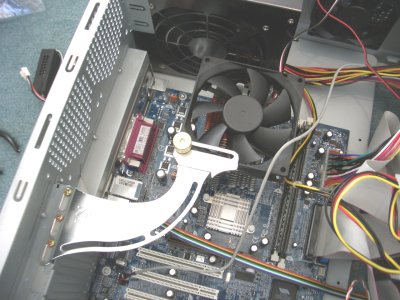 CPU fan not in action.
SpeedFan will let you (on a basic level) check temperatures inside your computer, and (on a more advanced level) view some of the diagnostic readings from the hard drive and even turn your fans on more or less often.
I don't recommend that option for beginning users.
Anyway, this free software can access lots of different pieces of information. I have two hard drives, and it was able to tell me that the temperatures were 36 degrees Celsius in one, and 48 degrees Celsius in another. A little Web research told me that these are well within acceptable ranges, so my computer is okay. Note that if you start seeing numbers like 60 degrees Celsius, this is a bad thing.
So, if you are wondering how hot it is inside your PC, this is one utility that you can download and use to check it. If you're someone who is looking for a good diagnostic tool to use on other people's machines, this is a good example of a free software program to have in your diagnostic kit.
Web Link:
http://www.almico.com/speedfan.php
Tuesday, September 09, 2008
Open Office 2007 files in older versions of Office
So, this semester, my college has made it the "standard" that we are using Office 2007. This presents some issues that we haven't seen in years, the issue of backwards compatibility. In other words, let's say you are running Office 2003 at home. If I mail you a Microsoft Word document in Office 2007 format, you are basically out of luck.
...that is, without an extra piece of free software from Microsoft.
If you are running Office 2000, Office XP, or Office 2003, and can not open Office 2007 files (they have slightly different extensions, such as .docx, .xlsx, or .pptx), the free Microsoft Office Compatibility Pack program will allow you to open these files.
I would highly recommend that you download this and install it, especially if you are a PCCC student. If you do classwork on campus computers, you'd have to otherwise remember to "Save as" an older format in order to work seamlessly between campus and home, and that's really not all that seamless, is it?
PC Users: Download Microsoft Office Compatibility Pack
One problem that someone verbally asked me about - this does NOT help with Access files. If you have Access 2003 and someone sends you a database in Access 2007 format, you're out out luck, even after installing this.
Now, why they haven't pushed this out as part of their Microsoft Update, I can not tell you.
Mac users only
If you are a Office for Macintosh 2004 or Office for Macintosh X user, you will need to go through a different process. You need to download a free tool called "Open XML File Format Converter for Mac 1.0". Yeah, that's easy to figure out.
Macintosh Users Download Here
...that is, without an extra piece of free software from Microsoft.
If you are running Office 2000, Office XP, or Office 2003, and can not open Office 2007 files (they have slightly different extensions, such as .docx, .xlsx, or .pptx), the free Microsoft Office Compatibility Pack program will allow you to open these files.
I would highly recommend that you download this and install it, especially if you are a PCCC student. If you do classwork on campus computers, you'd have to otherwise remember to "Save as" an older format in order to work seamlessly between campus and home, and that's really not all that seamless, is it?
PC Users: Download Microsoft Office Compatibility Pack
One problem that someone verbally asked me about - this does NOT help with Access files. If you have Access 2003 and someone sends you a database in Access 2007 format, you're out out luck, even after installing this.
Now, why they haven't pushed this out as part of their Microsoft Update, I can not tell you.
Mac users only
If you are a Office for Macintosh 2004 or Office for Macintosh X user, you will need to go through a different process. You need to download a free tool called "Open XML File Format Converter for Mac 1.0". Yeah, that's easy to figure out.
Macintosh Users Download Here
Saturday, September 06, 2008
Google "Chrome" Web Browser
After years of quiet on the Web browser front, there is a new entry in to the battle. Google has introduced a new browser in to the realm...
Being the computer person I am, I of course downloaded it immediately. We'll see what happens with this (it's still in Beta - or testing), but bringing Google in to compete with Microsoft's Internet Explorer and Mozilla Firefox will probably help things. Competition is good for the consumer.
Anyway, I installed it, and I figured I would take it for a little test drive. First impression - it allows me to import settings from other browsers - this is something Firefox also does, so that's good. After going through that, it brought me to a default page that says "most visited pages". The pages are displayed in little boxes, so you can see little previews of your frequently visited pages.
This seems like a clever idea to me. First impressions, good!
I then went to ESPN.com to give it a test. Why ESPN? Well, sports aside, this is a very media intensive page. It managed to block a popup automatically, good...Adobe Flash player was automatically setup and it managed to play a sports highlight...good...and then BOOM. Unable to fully display the page, would you like to reload?
Not a good sign!
It gave me the option to reload, so I did, and it worked just fine the second time.
So, how does it stack up? Here are my thoughts, simply from a usability interface.
Pluses:
Besides, for those of us who have Web design background, it gives you yet ANOTHER Web browser to test your site in. FUN!
Being the computer person I am, I of course downloaded it immediately. We'll see what happens with this (it's still in Beta - or testing), but bringing Google in to compete with Microsoft's Internet Explorer and Mozilla Firefox will probably help things. Competition is good for the consumer.
Anyway, I installed it, and I figured I would take it for a little test drive. First impression - it allows me to import settings from other browsers - this is something Firefox also does, so that's good. After going through that, it brought me to a default page that says "most visited pages". The pages are displayed in little boxes, so you can see little previews of your frequently visited pages.
This seems like a clever idea to me. First impressions, good!
I then went to ESPN.com to give it a test. Why ESPN? Well, sports aside, this is a very media intensive page. It managed to block a popup automatically, good...Adobe Flash player was automatically setup and it managed to play a sports highlight...good...and then BOOM. Unable to fully display the page, would you like to reload?
Not a good sign!
It gave me the option to reload, so I did, and it worked just fine the second time.
So, how does it stack up? Here are my thoughts, simply from a usability interface.
Pluses:
- Features you are used to are there - it has tabbed browsing, as Firefox and Internet Explorer do, built in phishing and malware detection, easy clearing of your browsing history, bookmarks....
- The interface is less cluttered than the interfaces you see in Firefox or Internet Explorer.
- It has an "incognito" mode - wow. Pages you view in the incognito window claim to not show up in your browsing history or search history, and will protect you if you visit Web sites that you aren't sure are trustworthy. I didn't test this fully, but a spectacular idea!
- It has it's own "task manager". If you've ever visited a Web page that locked up in Internet Explorer or Firefox, you've likely had to kill the entire browser program and restart. This allows you to kill certain bits of the browser, so let's say a Flash program is slowing me down, I can just shut that off without affecting the other things I am doing.
- Downloads show up along the bottom of the screen by the status bar - rather than disappearing immediately (Internet Explorer) or having a pop up window with downloads (Firefox)
- It doesn't seem to have the page setup options you have in Internet Explorer and Firefox (for example, print headers and footers or not)
- They didn't fix the problem I would love to see someone fix - block ads on a certain site - this can be done in another way, but it would be great to see this actually easy for the average user to do
- It has its own set of hotkeys different than the other browsers. Just a minor annoyance.
- If you close the only tab that exists in a window, it exits the entire program. This is not intuitive - one wrong click and you're going to have to restart the program. It should warn the user or give a blank tab.
Besides, for those of us who have Web design background, it gives you yet ANOTHER Web browser to test your site in. FUN!
Wednesday, August 27, 2008
Free online faxing
Up until a few years ago, if I had to fax something, I'd bring it in to work with me (shhhh!). I am sure many of you do the same, if you can. The primary reason in my case was that I didn't have a fax machine at home, so places (such as my insurance company) who didn't want email would require me to print something, find a device I didn't have at home, send it to them, and hope it got picked up and delivered on the other end to the right person.
My solution? A multifunction device (fax, print scan, copy). Not this model, mind you, but it's a visual aid, and pictures are pretty after all.

Anyway, if you have a small fax to send, one alternative to this is to use faxzero.com - this Web site will allow you to send up to two documents a day, each with up to three pages in it. You can upload an existing document from your PC, or if you only need text, you can just type that in to their text box. The first page you send will have some sort of ad on it, but hey, for free, what the heck? It's better than paying to have it done at Kinko's or Staples...and better than waiting until Monday if you're not going to work for a few days. Plus, if you already have it electronically, it saves you printing pages you are going to turn around and throw out anyway. Thumbs up on this one, a good little site to bookmark.
http://faxzero.com/
My solution? A multifunction device (fax, print scan, copy). Not this model, mind you, but it's a visual aid, and pictures are pretty after all.
Anyway, if you have a small fax to send, one alternative to this is to use faxzero.com - this Web site will allow you to send up to two documents a day, each with up to three pages in it. You can upload an existing document from your PC, or if you only need text, you can just type that in to their text box. The first page you send will have some sort of ad on it, but hey, for free, what the heck? It's better than paying to have it done at Kinko's or Staples...and better than waiting until Monday if you're not going to work for a few days. Plus, if you already have it electronically, it saves you printing pages you are going to turn around and throw out anyway. Thumbs up on this one, a good little site to bookmark.
http://faxzero.com/
Monday, August 04, 2008
So what do I do with that old hard drive??
To follow up last week's entry about information found on hard drives...
I used to work at a defense contractor in Clifton. I worked on a project that put radar jamming equipment and software on helicopters and other crafts. Some of the data we worked with was considered classified, so I know how that company handled it - they actually would burn all the materials, including opening up hard drives and melting the insides, burning floppy disks and USB drives, etc.
If you're not that paranoid, there is also a free software solution for home users, called DBAN (Darik's Boot and Nuke). This software program will allow you to boot up your computer, delete the contents of the drive securely, and be able to throw it out and trust that you'll be okay. According to Wikipedia, "DBAN prevents or thoroughly hinders all known techniques of hard disk forensic analysis."
It can be used not only for hard drives, but also USB drives and floppy disks as well. It also supports Windows, Linux, and Macintosh, according to the documentation, though I've only used the Windows version.
If you're a little nervous about a program like this, don't worry - I've used it before, and it has been reviewed by companies such as CNN.
The program can be found for free at dban.org:
http://www.dban.org/
I used to work at a defense contractor in Clifton. I worked on a project that put radar jamming equipment and software on helicopters and other crafts. Some of the data we worked with was considered classified, so I know how that company handled it - they actually would burn all the materials, including opening up hard drives and melting the insides, burning floppy disks and USB drives, etc.
If you're not that paranoid, there is also a free software solution for home users, called DBAN (Darik's Boot and Nuke). This software program will allow you to boot up your computer, delete the contents of the drive securely, and be able to throw it out and trust that you'll be okay. According to Wikipedia, "DBAN prevents or thoroughly hinders all known techniques of hard disk forensic analysis."
It can be used not only for hard drives, but also USB drives and floppy disks as well. It also supports Windows, Linux, and Macintosh, according to the documentation, though I've only used the Windows version.
If you're a little nervous about a program like this, don't worry - I've used it before, and it has been reviewed by companies such as CNN.
The program can be found for free at dban.org:
http://www.dban.org/
Thursday, July 10, 2008
Online To-Do List
Personally, I use Yahoo calendar to keep track of my "to do" list. However, there are a lot of limitations.
One of my friends swears by a free site called Remember the Milk. They will let you set up a calendar, but also do more advanced things like map directly to locations, and get reminders over cell phones, email, or instant messenger programs. It also works and directly synchronizes with Google, the iPhone, Blackberry devices, and Twitter.
If you are not all that organized, it might be worth trying out!
http://www.rememberthemilk.com/
One of my friends swears by a free site called Remember the Milk. They will let you set up a calendar, but also do more advanced things like map directly to locations, and get reminders over cell phones, email, or instant messenger programs. It also works and directly synchronizes with Google, the iPhone, Blackberry devices, and Twitter.
If you are not all that organized, it might be worth trying out!
http://www.rememberthemilk.com/
Friday, June 20, 2008
Bitmap image conversion to vector image
Image editing application software such as Photoshop or Fireworks contain a tool that will allow you to convert a bitmap image (such as one taken with a digital camera) in to a vector image (one that looks "drawn" - and one that can be resized easier.
If you are ever doing any professional logo design and have very little Graphic Design talent (guilty!), you can take an existing photograph and turn it in to a vector image to save yourself time drawing. For example, let's say you wanted to make a cell phone logo - you could take a picture of a real cell phone, "vectorize" it, and then just edit it to suit your needs.
If you're curious as to what I am talking about, you can actually try it for free on a Web site such as vector magic - they will let you try it for free without letting you save - or you can do it in a tool such as Photoshop or Fireworks.
Try it on Vector Magic's Web site for free
How to do it in Photoshop
If you are ever doing any professional logo design and have very little Graphic Design talent (guilty!), you can take an existing photograph and turn it in to a vector image to save yourself time drawing. For example, let's say you wanted to make a cell phone logo - you could take a picture of a real cell phone, "vectorize" it, and then just edit it to suit your needs.
If you're curious as to what I am talking about, you can actually try it for free on a Web site such as vector magic - they will let you try it for free without letting you save - or you can do it in a tool such as Photoshop or Fireworks.
Try it on Vector Magic's Web site for free
How to do it in Photoshop
Subscribe to:
Posts (Atom)