Showing posts with label Google. Show all posts

Tuesday, November 15, 2011

Google+ at the four month mark

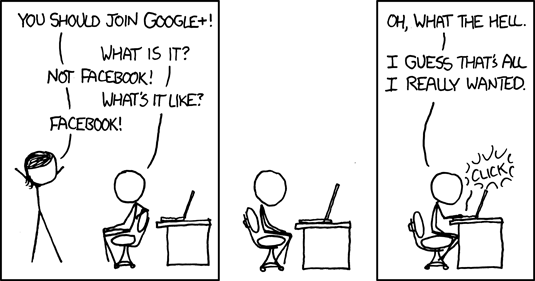
Google+ is Google's new social networking site. Google released this in the summer of 2011, and so far, it has picked up a lot of users. However, it seems to have lost some of the early momentum.

Spot on, xkcd!

I feel like Google versus Facebook will be a tremendous battle. Facebook has already reacted and quickly started to implement some of the features Google+ offered. Competition is usually a good thing for consumers, after all! Now that Google+ is a few months old, it is less of a novelty.

As it becomes less of a novelty, people start to take a more critical eye to it. One of Google's engineers, Steve Yegge, accidentally (?) posted a rant about Google+ last month. To summarize his complaints, Google+ does not make it easy for other people to create Google+ apps, therefore making it difficult for app developers to create Google+ apps. This is certainly a current limitation of the system.

Will Google+ adapt or die? We shall see.

Also, I have a Google+ profile set up, if anyone would like to add me.
Saturday, August 20, 2011

Google and Motorola

I love technology, in part because there is more drama than an episode of Mad Men.

 Google bought Motorola Mobility, who makes a number of mobile handsets. Motorola has been involved in a number of technology areas for a number of years. In 2000 or so, I had a Motorola pager. They've obviously graduated to smart phones by this point.

The company also makes processors and tablets. As a matter of fact, for many years, the Motorola processors were the only processors found in Apple computers. They've since gone to the same processor as you find in a PC.

The interesting part here is that Google now enters the mobile market full force. Will Microsoft feel the need to respond? Will Google's new Motorola products overtake Apple? Is Google trying to take over the world? Time shall tell.


Link to story

Tuesday, August 09, 2011

RIP Google Toolbar?

I hate filling out forms on the Internet. For a while, I was using a tool called Roboform to assist me with it. The problem with Roboform was that there was a trial version, but to use the full version, you had to pay.

Google eventually introduced a form assistant in their Google Toolbar program, and I downloaded and installed it. I've been using the Google Toolbar for a while; it did what I needed, and though not as full-featured as the Roboform tool, it is free.

Firefox 5 recently came out, and when I upgraded, I got the warning that some of my add-ons were not compatible. Among them was the Google Toolbar. I figured Google would figure it out and send out updates eventually.

It turns out Google, surprisingly, has decided to no longer support the Toolbar in Firefox according to Google Toolbar's blog. This is disappointing for me, if for no other reason than I don't like change when I am used to something.

I've downloaded AutoFill Forms for the moment, and it seems to be working out. It is free, relatively unannoying, and functional. If you are looking for a replacement, or do not have a tool to fill out forms automatically, I would recommend trying this tool. There are of course other options available, but this works nicely for me.

I am just surprised because Google generally seems to be on the same page as Firefox. RIP Google Toolbar, at least on my computer.

Wednesday, June 15, 2011

Google Image Stalking

So, Google is introducing a few new features, and as always, the applications can be used for evil.

One of the features aims to allow users to ask questions through their microphone, and have Google search for the words you speak rather than requiring you to type them in. It will recognize your voice and send the words to the search engine.

Another new search is the Google Search By Image. This feature claims that it will let you upload a picture and find information about that picture. For example, if I have a picture of me in front of a building, Google Search By Image would attempt to identify that building. That seems really interesting.

I decided to test it out with some pictures of a trip I took. I went to the Google image search, and downloaded the Firefox extension which allows you to right click on any image in your Web browser and search the Google Search By Image tool for it. However, it doesn't work with Firefox 4.0 yet, so I decided to try it in Google Chrome. I then dragged a few images in to the browser.

I had some pictures of a cruise I took last summer, so I decided to try those.

First, I tried a picture of a lighthouse I saw in Canada. It came up with some pictures that were very similar, but they were the lighthouse in Cape May, NJ.

I decided to try something easier, and I dragged a photo of the Statue of Liberty there. Google Search by Image correctly identified it and returned other images of it and a link to the Wikipedia article.

I tried a picture of a random chunk of the NYC skyline, taken from sea, and that also did not return anything useful.

I tried a picture of a pretty distinctive tour bus from St. John's, Canada, and it wasn't able to match that either.

Verdict on the image locator: weak so far.

Google also claimed it could locate an image that is on the Web. I dragged an image of something I am selling on Craigslist, and it was able to immediately find and display that for me. I dragged another image of something I am selling on eBay, and it was able to find that. Finally, I tried an image I downloaded randomly, and it was able to show me where that image came from. I would say this is a success.

Verdict: This could also be pretty powerful if you are checking to find where an image came from, in case you want to use legally it in a publication, but isn't going to be able to determine where a vacation photo was taken unless it has a pretty obvious or distinctive monument in it.

Google does claim there is no facial recognition that will be available. Color me suspicious.

For a number of years, Google had a free 411 service called Google 411. Many people felt like the reason Google was doing this was to allow testing of their voice-recognition algorithm. All of a sudden, they have Google voice search. I would assume they tested and improved their algorithms in part with their free 411 service.

Now, Google is going to claim there is no facial recognition that is available. However, they will be amassing a powerful database of photographs. The Google privacy statement seems to allow them to keep Web requests, and my interpretation of an image is that it is a Web request.  Given what they did with Google 411, I would suspect that they will save the images you upload for their own testing purposes. Could facial recognition be something they are testing?  Who knows.

I tend to trust Google more than some of the other big name companies, but just because they aren't making facial recognition available to the public, doesn't mean they aren't gathering our uploaded photos to test their software.

I also have some concerns about how, if this technology develops, people might use this to stalk or harass other people. For example, let's say someone uploads a few pictures to their Facebook, or hacks their phone, or steals their digital camera. If someone is trying to hide from someone, those pictures may be searchable and usable. In addition, let's say a criminal finds a digital camera and notices people wearing nice jewelry in it. Could the pictures possibly lead them to a person's residence? As I said before, this does not seem to be at that point yet, but always something to think about.

Thursday, January 06, 2011

Verizon, Google, and Net Neutrality

The idea of "net neutrality" is an important one. All ISPs (Internet Service Providers) work together in a collaborative way on the Internet. There are a few key points:
  1. ISPs and other Internet companies do not discriminate against each other's traffic (for example, Gmail won't block all email from Yahoo! accounts to try to convince people to use Gmail, and vice versa).
  2. Every Web site should have the same priority. In other words, pages from Amazon won't be transmitted before pages from some small Web site. This also his prevents companies like Comcast and Verizon (in my area) from trying to get exclusivity agreements with certain sites. For example, right now net neutrality would prevent Comcast paying YouTube a bunch of money in exchange for having faster YouTube connections (and effectively slowing Verizon customers). If they could do this sort of thing, it would make our lives as consumers much more complicated.
  3. Finally, in practice, this prevents Internet Service Providers from filtering our content and throttling certain types of downloads (for example, blocking or slowing down downloads from file sharing sites).
Note that this isn't the same as monthly download traffic caps, which some providers (such as Comcast) have, and others (such as Verizon FIOS) do not.

Anyway, one of my students (thanks, Kevin!) brought in an article (available here on PC World's Web site) last semester that details a Google/Verizon pact. It sounds great in theory, but there are some ideas that may be shady. First of all, though it says the Internet should maintain net neutrality, they include the phrase "lawful Internet content", which some people interpret as a way to stop file sharing. Secondly, they do not address wireless access, because they feel the market is competitive enough. Finally, there is a provision for a private Internet which would not be covered. Though this could be something positive (stuff like health care systems), others interpret this as a way companies might find a way to exploit and get around net neutrality.

It sounds bad, but a bigger issue is this is all informal as it stands, and companies can do whatever they want at the moment. Something needs to be in place and formalized, and as I've mentioned before, most of the people in Congress do not have a technology background. I just hope we do not find ourselves in a bad situation in five years because Congress got Rickrolled by Verizon and Google.

Sunday, November 21, 2010

The Gmail Killer

Facebook is preparing to come out with a new email service, where users can get email sent to an email address @facebook.com. There were a number of headlines that advertised this as "the Gmail killer", though it could just as easily be "the Hotmail killer" or "the Yahoo! Mail killer".

First, Facebook started to try to be your "one true login". They seem to be succeeding in this, because a number of sites have started to give you the option to sign in using Facebook instead of creating an account. For example, here are some random sites that came up when I Googled "Facebook Connect":

Evony
Joost
SurveyMonkey
TravelPod

Facebook even has taken so much of Myspace's market that they are introducing a "connect with Facebook" option. That's the ultimate admission on Myspace's part that Facebook has won the war.

Facebook has succeeded there, so they are looking to expand. The next horizon seems to be Facebook email, which they've announced plans to implement. Facebook's CEO says that this email will be even better because they know who your friends are. No, really.

"Because we know who your friends are," said Facebook CEO Mark Zuckerberg, "we can do some really good filtering for you."

There is something a little creepy about that, but I do think this idea will take off. The interesting part is this: back in the early 2000's, sites like AOL had email and chat services, and tried to expand in to profiles...same with Yahoo! and MSN. None of those transitions worked well. However, Facebook starting with profiles and expanding to chat and then email might actually work.

So, Facebook vs. Google...who wins? Time will tell.

Link to story

Tuesday, September 21, 2010

Using Google Earth to make $75,000

Just another case of learning from my students...

In class today, we were discussing Google services, including the advanced Google search options, image search, and Google Maps. It came out during class that the town of Riverhead, NY used Google Earth in a very interesting way. People started getting summonses for having illegal pools, and it came out that they were using Google Earth to find this out. Really! Turns out they wrote about $75,000 worth of summonses before people caught on and complained.

NPR did an interview with the chief building inspector of the town, and he said they did it for the protection of the neighborhoods, saying "I use it strictly for safety." Of course, there is some validity there, because as he states, there are requirements to make sure children don't drown, and I agree with that. I also think that, well $75,000 had something to do with it. I'm a little cynical when someone won't admit to that. Of course money making is part of it. It's not just about safety.

In the "DUH" statement of the year, he stated "Most of the people that complained were the ones that didn't have the permits." Of course those are the people that complained, because they were the ones who were directly affected and may or may not have had their right to privacy violated.

The town is no longer doing this, so I think that tells us how they feel about whether it was a good decision. If they thought it was, they would have kept on doing it. My opinion? As someone who worked for a company doing government contracting, we were told that the government could not spy on its own citizens. The government tried to implement domestic spy-satellite imaging through the innocuous-sounding National Applications Office, but this idea was withdrawn over privacy concerns. If the government can't do it using our own satellites, why can they do it using Google's? Again, my opinion, they shouldn't be doing that, but that's me.

The other interesting part is Google. This sort of use of Google Earth is not prohibited, either in the main terms of service or the government agency terms of service addendum. Yes, I checked. In theory, this is fine per Google's viewpoint. Then again, they haven't updated the terms of service in a while.

Sunday, June 27, 2010

Easter Eggs

The term "Easter eggs" refers to features that are hidden inside of a software program, DVD, or other such technology.  For example, back in the original Nintendo days, there was a game called Contra.  You started with three lives, and that was a pain.  However, you could also enter a code (now known as the Konami code - after the game manufacturers) to give you thirty lives.  It's been years since I played the game, but I still remember you had to hit up, up, down, down, left, right, left, right, B, A, and then Start, and you would start the game with thirty lives.  That was my first experience with Easter eggs.  Nowadays, you can find many sites that list the Easter eggs in video games.  Aside from video games, many DVDs now come with Easter eggs built in, as you can find on this site


There are typically Easter eggs built in to software, as well.  For example, Microsoft Excel 97 used to have a flight simulator built in to it, but Microsoft apparently removed Easter eggs in their software in 2002.  Note that sometimes people get confused as to what is a hidden feature and what is an Easter egg.

Anyway, even Google has some Easter eggs in it, and I saw an article showing some of them.

Top 15 Google Easter eggs

Thursday, February 25, 2010

Finding Porn by Accident on Google

When I teach Google to my CIS 101 classes, I find that many people have never even noticed the "Advanced Search" option, which allows you to use more advanced options (such as how recently the site was updated).

Likewise, when searching for images, there is an option to allow you to change how images are filtered.  The default is for images to be filtered at a "Moderate" level, but you can switch this to more and less restrictive levels.  If you switch the filtering off, you get some interesting results, to say the least.

Cracked.com (a Web site that may not be all that safe for work) had an article about this - they discuss nine seemingly innocent searches that end up with pornographic results on Google image search.

Read on unless you are easily offended.
Link to Cracked.Com Article

Saturday, February 13, 2010

Free Stuff Contest - $100 Google AdSense Credit

People always seem to wonder how Web sites make money.  Much like television, much of the money comes from advertising.  Large companies have enough staff to set up and maintain advertising relationships, but most small companies and one-person Web sites do not have the staff to do all that work.  This is an excellent way for people to make money on the Internet, without needing a huge infrastructure.

One of the companies that does this type of advertising is Google.  People who want to advertise with Google sign up through Google AdWords, and those advertisers pay for the services they want.

The other half of the equation is Google AdSense.  Google AdSense is the site where people who have content (bloggers, small Web sites, etc.) can sign up.  Google gives them the HTML code, and all the person needs to do is add that code to their site and ads show up.

Google, by being the "middle man", makes money connecting the two.

I participate in the Google AdSense system, in large part because when I teach these concepts, I can say that I know how to do them from experience.  I don't have the traffic to make any real money off of it.

Anyway, Google recently sent me a letter that included a free $100 worth of Google AdWords advertising credit.  I could advertise my blog, but I don't really see the sense in it, so I figured it might be nicer to give this advertising credit to someone who might actually have a use for it.  This credit starts losing value after 3/5/10 and expires completely on 3/31/10, so you have to sign  up and apply it to your account before that point.

This is open to students and non-students alike.  To enter, just email me and tell me why you want it.  Anyone with a Web site to advertise is eligible.

Since this is a limited time offer from Google, email me as soon as possible.    Again, all I want is to see it go to good use.

Monday, January 04, 2010

10 for 2010 (Technology Predictions)

I was thinking about what we are going to see in 2010, and here are some things that came to mind.
  1. Standard DVD Format Gets Phased Out - Blu-Ray will become the dominant DVD media, and as a result prices will fall on these devices.  I wouldn't be surprised to see some low end Blu-Ray players going for $100 this Black Friday.  Since Blu-Ray players can play your old DVDs, people will be less resistant than they were when VHS was replaced by DVD players.
  2. Standard Internet Sales Tax - Some smart politician somewhere will author a bill that will come up with a solution to the whole Internet sales tax issue.  Too many states (Rhode Island, North Carolina) are fighting legal battles with vendors (Amazon) over laws that were originally written in 1887 (really), and e-commerce has become so large that someone is going to fight this battle.
  3. Office 2010 Will Disappoint - If one looks at the specifications, Office 2010 seems to do some clever things.  Microsoft Works is being phased out and there will be new tools "Word Starter" and "Excel Starter".  These will be the cheaper versions of the tools, and this is great because no one seems to be able to differentiate between "Works" and "Word".  The Ribbon interface will find its way in to Publisher, Visio, and the rest of the tools that it wasn't integrated into previously.  Microsoft will also introduce Web-based versions of Word, Excel, and PowerPoint that will allow people to use the tools online for free, much like Google Docs.  With all that said, I just wonder if Microsoft may be overly ambitious, and cut some corners with the release of Office 2010.  I also feel like the operating system release followed by the Office release will split the focus of the company, and they are more likely to pour resources in to any Windows 7 problems that arise, following the debacle that was Windows Vista.  This would obviously take away from other projects in the company (such as Office 2010).
  4. eBooks Take Off - eBook readers (such as the Amazon Kindle) will become more popular.  As demand goes up, prices will fall, and this will make these devices available to many people.  College students will be driven by lower prices (for example, my Internet/E-Commerce class textbook goes for $113 new, but the eBook version is $57 for a 6 month subscription), and the ability to electronically mark up your book without having to worry about ruining the resale value.
  5. Netbooks Emerge - Netbooks will take off and become a popular alternative to a laptop for people that just want a basic portable machine.  As we see with cell phones, people don't always want all the stuff you get with a PC, they just want something to do the basics on, and Netbooks will fill that void. 
  6. eNews - More newspapers and magazines will work towards making a digital model work.  According to an article linked from Magazine Death Pool, 367 magazines ceased printing in 2009 (and another 64 went online only).  This industry HAS to adapt, because times are changing.  To be quite honest, the only reason I get my paper is for the Sunday coupons, and the rest of the paper is immediately recycled.  If advertisers decide that online is where the money is, print media will have to follow.  They are also competing for advertising dollars with radio stations (both local stations like 1010 Wins and national stations like NPR) and with TV stations (again, both local news outlets like News 12 and global stations such as CNN). 
  7. New Careers - Careers with titles like "Medical Informatics" will start to arise.  There is a need for people who have knowledge of both medical and technological concepts, and this seems like an area that will start to grow.  For example, insurance companies may not want to pay for a full-time nurse for someone, but instead have someone monitor remotely.  That person would need to interpret the results and know things like blood pressure and O2 saturation...but also be able to troubleshoot the technology if there are problems.  NJIT is one local institution that has already created a degree program for this.
  8. Bing Takes Off - Bing will start to do what Microsoft Live Search didn't do: take away market share from Google.  Not a huge percentage, mind you, but it will start to make headway that other search engines could not.
  9. Skype Makes a Comeback - Free from eBay's control, Skype will find direction and challenge VoIP providers.  Technology like a Wireless Bluetooth Headset for the PC (i.e. this one: AmbiCom SKYHS-KIT) will attract people who want the freedom to roam their apartment while making calls. 
  10. The Mets Win! - The Mets will win the World Series.  (Hey, a guy can dream, right?)  I doubt even the guys at metsblog.com will be predicting this one.
I hope you are enjoying your 2010.

    Thursday, December 03, 2009

    Time Saving Google Tips

    There are many ways that you can save yourself some time on Google.  I always am amazed at how they update the search engine and add features as time goes on.

    Some of the features have also been there for years, and there are a number of them that are documented on the site below.

    Link to Site

    Thursday, October 01, 2009

    Ride the Wave

    Yesterday (9/30/2009), Google released a new product, Google Wave, to 100,000 testers. Basically, this is Google's way of trying to bring together word processing, instant messaging, social networking, blogs, and directions. For example, in a video, they allow you to have a conversation with someone through chat, and have it autopublish to a Web site. (I can see this being extremely useful in technical support, for example - you could have chats published, and then when people search for that problem, it shows up.

    It is a technologically interesting tool, but I am not 100% sure of whether this is really going to take off. Time will tell, as will the 100,000 beta testers (not counting the ones who sold their invite on eBay!)

    Google Video on Wave
    CNN Story

    Sunday, June 28, 2009

    Become a Gmail Ninja

    Google's Gmail is a nice little email program, ignoring questions about privacy, of course. For example, there are ways to set it up so you can automatically filter things. If your email address is JuanPena@gmail.com, you can create "disposable email addresses". I could send email to JuanPena+dfkjhasdkjlhfldksj@gmai.com an it would still get to you. You could then give out one version of your email to your friends - the easy one - and use another one for Web sites you trust - and a third version for Web sites that you don't really want to have your email address, but you have to give them one for something.

    The cool part is that you can then use Gmail's filtering system to automatically ignore anything sent to the junk version of your email address - so if someone emails JuanPena+spam@gmail.com, you could have that automatically put in to a garbage folder, or you can have it deleted automatically!

    Obviously this is not something everyone can do easily. What Google decided to do is create the aforementioned Gmail Ninja site. They've divided things up in to four categories - basically, easy, medium, hard, and really complex - and this way, based on the skill level you select, it will show you tips.

    I like this idea because there are plenty of Gmail help sites out there...and Google has taken ownership of it and organized it in a logical way.

    http://www.google.com/mail/help/tips.html

    Thursday, June 18, 2009

    Youtube Annotations

    Technology changes all the time, even in the short time that I've been involved in it. One of the things I remember is how difficult image editing was in 1995. It's become easy to do, not only using application software, but now even using Web based applications, such as Youtube. Youtube has even added the ability to add annotations - stories, notes, and even links. This is not brand new - it was added last June - but it is a neat little feature, and of course, Youtube will certainly keep adding features. Now, maintaining the site has certainly cost Google money (estimates are as high as $500 million dollars), but they can afford it. Amazing, when you think about it, huh?

    http://www.youtube.com/t/annotations_about

    Tuesday, June 09, 2009

    Bada Bing

    Microsoft has had a search engine for a while, and it just doesn't compete with Google - not that much does these days. They've decided to repackage their existing MSN and Live search tools in to a new tool with a new name: Microsoft Bing.

    They feel like they'll be able to compete with Google for ad revenue with this change.

    I took a quick look - it has a nice look, and they stole the "simple" approach from Google. Instead of a hugely cluttered page, it's much simpler than before, and I like the "Popular Now" feature. I did a few searches, and Google still came out ahead in terms of finding what I want. However, this might be something that gets them some attention. I'd encourage you to check it out, if nothing else!

    www.bing.com

    Story about Bing

    Saturday, June 06, 2009

    How to attract Web site visitors

    One of the things we don't spend a lot of time on in our curriculum is how people can attract people to their Web site. You can have the best looking Web site, one that does a ton of cool stuff, but if no one visits it, you've got a problem. As a Web developer, customers will look to you for some expertise in this area.

    Of course, one of the best things that can be done is for a person to start advertising themselves - print new business cards with the Web site address, add the address to existing publications (menus, newsletters, whatever), etc. Making information available is definitely one of the goals of a Web site, and if putting prices or directions on the Internet helps someone find you without calling your employees, you've saved time, and therefore money.

    However, this does not address how to attract new customers, which should also be part of a Web presence goal. Let's say you did a Web site for a small pizza place in Paterson. Someone new to the area says "I want a pizza" and puts pizza paterson nj in to Google...will your site show up? Will it show up high on Google's rankings?

    (Those are two VERY different questions, by the way)

    You can submit your Web site to just about any search engine for free. For example, you can add it to Google here:
    http://www.google.com/addurl/

    The only problem is, you're not going to show up at the top of the rankings.

    You could also pay to have this done, and it's typically around $50-$100 to submit your site to over 100 search engines, big and small. It sounds like a lot of money, perhaps, but if you're being paid $30 an hour to do Web site design, it would take you more than 3 hours to submit to that many search engines. It might be worth charging the customer for that and letting the service do the work for you. (an example of how this service works)

    There are also ways you can optimize your placement. There is no one solution that is perfect - no one knows the exact formula Google uses to rank pages, though we have guesses. There are times where you can re-order words, change HTML code, etc. to improve your ranking on Google. The META tag keyword choice is important - what words to choose? How many to use? Use too many and your keywords seem less important to Google, too few and you may not be found.

    Though it is an expense, sometimes it pays off to pay to advertise the Web site. There are many services, including Google AdSense, that will allow you to advertise. There are also more targeted Web sites. For example, you can advertise locally on yellowpages.com, or on local sites like northjersey.com or patersononline.com. This way, you are relatively sure you are getting people who are local to you. If you are dealing with a client base who speak another language, knowing local publications in that language can help as well (for example, eldiario.com for Spanish speakers).

    Tuesday, May 26, 2009

    Google Voice

    Coming soon...Google Voice.

    Basically, Google purchased a company called GrandCentral a while back. GrandCentral provided a service that allowed people to have one phone number associated with a bunch of phone lines. There are many neat applications to this technology.

    So, for example, let's say I have both a cell phone and a home phone. Using this service, I could set it up so if someone called my cell phone, both my home and cell phone would ring.

    Looking at this another way, if I had a small company and wanted to have a few people doing technical support, I could set it up so that between midnight and 6 am, all calls get routed to one person, from 6 am to noon all the calls get routed to another, etc.

    Or, let's say I have a small company, and I want to provide customers one phone number. I could create one number for the company, and then set it up so that it rings all of my customer service representatives, and whoever picks it up, gets it.

    This is basically the way telemarketing companies work, except now you can use that for your own purposes, be they personal or professional.

    Google saw how cool this is and purchased the company, and they've been working on this for the last few years. They announced in March that coming "soon", this service will be available to the public for FREE.

    There are other features as well, including blocking numbers and personalizing what happens when certain people call.

    There's a lot of potential here. I personally have three phone numbers (land line, cell phone, work phone), and I get no cell phone reception in my apartment. When people call my cell phone at the moment, I have to call them back from my land line while in my apartment. It would be so nice just to pick up the house phone rather than the cell phone.

    Google Voice information
    New York Times article

    Wednesday, December 10, 2008

    Let Me Google That For You!

    There are a lot of times that my familiarity with computers gets the best of me. Someone will say something that I don't understand (in an instant messaging conversation, let's say). I immediately will put that in to Google and figure out what it means. However, not all people think that way, leading to me explaining something that could very easily be put in to Google.

    I'm usually very polite about it, but many computer people are not, and I am sure one of them is behind the site LetMeGoogleThatForYou.

    For example, if you were to say "I have to get a new hard drive" and someone responds with "what is a hard drive?", you could link them to this:
    http://letmegooglethatforyou.com/?q=hard+drive

    It's basically a snotty way of saying "you could look this up yourself".

    I got a good laugh out of it, anyway.

    Friday, October 10, 2008

    Google's Best Logos

    Google recently turned 10 years old. They even have a Web site for it! No word on whether they had clowns and balloons and a big ice cream cake.

    Anyway, you may have noticed that Google will change their logo, based on certain holidays and other events. The Daily News recently sifted through the archives and picked out what they considered some of the best logos in Google history. There are some really clever ones in there, and I have to give Google credit for constant creativity.

    I still can't believe that we've only known the word "Google" for 10 years.

    Web Links:
    Thanks to Sue for the heads up!