Wednesday, February 08, 2012

It's Official! I am an Author!

As some of you know, I took the 2010-2011 academic year off at Passaic to work on some projects. One of these projects was writing a textbook, and it was awesome to see it has been published and is on Amazon's Web site.

It really has been a dream of mine to actually author a textbook, and Pearson gave me a chance to do this with a small textbook in their Your Office series. The series editor, Amy Kinser, had a vision for how she felt the books should be, and it sounded a lot like the way I try to teach application software. Instead of "click click click", I try to talk about how certain features may be useful in a business environment.
Visit my book on Amazon!

Interestingly enough, the writing wasn't difficult for me. The most tedious part ended up being creating good screen shots, getting them labeled, getting permissions, and so on.

The book definitely will not make me rich - as it is designed to be packaged with the Your Office: Microsoft Office 2010, Volume 1 textbook, I was paid a flat fee rather than a commission. However, it was an exciting start to an authoring career. I hope to contribute more to other texts in the future, and having gone through the process, I know I can do it.


Monday, January 23, 2012

Death Wishes via Twitter

As a Giants fan, yesterday was a good day. The 49ers played a great game, but in the end, a few mistakes by a player pushed in to an unfamiliar role did them in.

The last time the Giants and 49ers faced each other in the playoffs (2003) the same sort of thing happened. A player named Trey Junkin was signed out of retirement to snap the ball for field goal attempts. He messed up a snap earlier in the game, and at the end of the game, he messed up another field goal snap and the Giants lost the game. Junkin faded away in to relative anonymity, though he had to read about the Giants in the newspapers.

In last night's game, a young player named Kyle Williams was pushed in to the role of punt returner because of an injury to the player who regularly filled that role, Ted Ginn Jr. Williams had only returned two punts this season. In the early part of the game, Williams made a mistake and the Giants got the ball. In overtime, he fumbled the ball, which led to the Giants kicking the winning field goal.

Trey Junkin was 41 years old at the time of his mistake, while Williams is 23 and a part of the 49ers team plans. The thing I want to highlight, however, is how the Web changed the reaction.

A number of fans of the 49ers went to Twitter, and Kyle Williams had his account listed and available for fans. Fans rushed to Twitter and starting sending him death wishes. Though a number of news outlets have called them "death threats", I haven't seen any evidence of that online. As opposed to threatening to kill him, they have sent messages saying they hope he, his wife, kids and family die, or that they hope he gets AIDS and dies. (Read some of the quotes here). Of course, if they were really extreme, they may have been deleted or reported to Twitter.

It is a shame how Web 2.0 technologies can lead to things like this.

Monday, January 09, 2012

The Perils of Communication

This is a story that 20 years ago probably might have made the local news, and not CNN.

An Asian Papa John's customer in New York City ordered a pizza and after she left she noticed the area that says "customer name" listed her name as "lady chinky eyes". Obviously, a cashier thought they were being funny identifying her in this way.

Twenty years ago, she might have just ignored it after being annoyed. These days, she posted a tweet with a picture of the receipt, and it went viral.

This led to the employee being fired within 48 hours and an official apology being posted on Papa John's Facebook page.

The perils of being a smart ass in the information age!

Link to CNN story

Thursday, December 29, 2011

Photoshop Phriday

There are a lot of bizarre little Web sites on the Internet. One of them is SomethingAwful, which does a pretty good job of being funny and sometimes offensive. They have a contest every week called Photoshop Phriday, where you are given a theme and offered the chance to create an image to go with that theme. Sometimes they put out a starting image and people make changes to it. Definitely amusing, if you are not easily offended! That is always the problem with sites that are based on user contributions, of course.

Link to site

Sunday, December 18, 2011

The End of Another Semester

So, the semester comes to an end again, a group of students moves on, and a new group prepares for the Spring semester.

Back in the stone ages of the 1990's, when I was in college, some fraternities used to carry around books containing teacher ratings. Of course, nowadays, it is much easier on the Internet. I love the idea behind ratemyprofessor.com - this is a free site that does not require signing up, and it allows you to anonymously post ratings for your professors.

Of course, there are always students who dislike certain professors who everyone else loves, but the more ratings a professor receives, the more accurate you would assume the rating is.

In terms of positives in my class, I know I have a passion for the material and I do try very hard to make it something students can relate to. I also try to encourage dialog in the classroom, and make it safe for students to ask questions. I also try to be entertaining and avoid using the PowerPoint presentations. Sometimes students don't like that teaching style. I also know some students dislike that they need to read the book, be on time to class, and turn work in on time. Personally, I feel like timeliness is critical one students transition to the business world, so I choose to emphasize these things in my classroom.

It's a great site, and here are links directly to my ratings pages:

Ratemyprofessor for me (Passaic)

Ratemyprofessor for me (Bergen)

Friday, December 02, 2011

When Web marketing goes wrong...

There are a few companies making names for themselves in marketing. LivingSocial, Groupon, Gilt Groupe, and restaurant.com are some of the sites that have popped up that offer consumers deep discounts on various types of services. LivingSocial and Groupon are sites that are especially geared towards localized services. For example, my students and I looked at the sites the other day, and we saw packages such as a spa day, keratin hair products, and a day of go-kart racing, all offered at a discounted rate. The advantage for a company is they attract new customers by offering a discount, and the advantage to the consumer is they save money.

Is this a sustainable business model? I am not sure. I do know you sometimes hear horror stories about sites like that. Generally, they have to do with the stampede effect created by Groupon and LivingSocial. As opposed to restaurant.com, which will give businesses a random amount of business, Groupon and LivingSocial tend to bring a stampede of business in around the same time. Some companies report regular customers being driven away by deal-seekers.

These sites do allow businesses to limit the amount of purchases (see Groupon terms here). However, businesses sometimes underestimate the demand for deal-seekers. For example, a British bakery recently offered a deal for a dozen of their gourmet cupcakes for $10. This was 75% off their normal price. This bakery chose to do all the deals at once (link to article), rather than spreading them out over a few weeks, and also chose not to cap the number of purchases, which many companies do. The normal monthly sale volume was around 1,200 cupcakes a month, they ended up making about 102,000. The owner had to bring in temporary workers just to meet their end of the bargain.

Now, could Groupon do a better job helping the customer avoid disasters like this? I am sure they could. However, the bakery owner also has to realize that caps exist for a reason, and should have seen the potential issue with opening it up to everyone with no restriction. That said, you have to feel for the owner who made this decision and cut in to what was likely a thin profit margin.

Tuesday, November 15, 2011

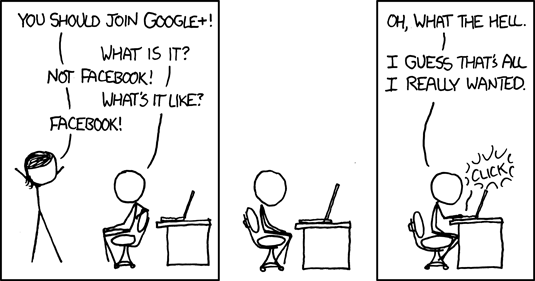
Google+ at the four month mark

Google+ is Google's new social networking site. Google released this in the summer of 2011, and so far, it has picked up a lot of users. However, it seems to have lost some of the early momentum.

Spot on, xkcd!

I feel like Google versus Facebook will be a tremendous battle. Facebook has already reacted and quickly started to implement some of the features Google+ offered. Competition is usually a good thing for consumers, after all! Now that Google+ is a few months old, it is less of a novelty.

As it becomes less of a novelty, people start to take a more critical eye to it. One of Google's engineers, Steve Yegge, accidentally (?) posted a rant about Google+ last month. To summarize his complaints, Google+ does not make it easy for other people to create Google+ apps, therefore making it difficult for app developers to create Google+ apps. This is certainly a current limitation of the system.

Will Google+ adapt or die? We shall see.

Also, I have a Google+ profile set up, if anyone would like to add me.

Tuesday, November 08, 2011

Spring 2012 Semester Schedule

I am in the process of figuring out my Spring 2012 schedule. Of course, my schedule is up in the air until we are certain some classes will run. For the moment, here is what I know.

Definitely mine:
CIS 125 M02 (Microcomputer Software I): Tue/Thu 10:20 AM to 11:35 AM Paterson Campus
CIS 273 ME1/GD 273 ME1 (Web Graphics): Thu 7:05 PM to 9:35 PM
CIS 294 M01/GD 294 M01 (CIS Internship): Times TBA

Probably mine:
CIS 101 P01 (Computer Concepts and Applications): Mon/Wed 10:20 AM to 11:35 AM Passaic Campus
CIS 101 P02 (Computer Concepts and Applications): Mon/Wed 8:55 AM to 10:10 AM Passaic Campus

Here's where it gets complicated. If the CIS 125 P01 runs at Passaic, that will probably be mine, but if it does not, then I may get one of any number of classes.

At Bergen:
INF 163 001 (Internet Concepts and Applications): Mon/Wed 3:55 PM to 5:50 PM Paramus Campus

Saturday, October 29, 2011

Microsoft SyncToy

Moving between machines is always difficult. If you keep files on your hard drive, problems arise with forgetting files. So, if you copy them to a USB drive, you can end up with two copies to a file, which can be even worse.

One way to combat this is to use an online storage solution, such as Microsoft's SkyDrive. SkyDrive is basically an online USB drive, with access to Microsoft's Office Web Apps. Google has a similar functionality through Google Docs.

However, if you are looking for something that doesn't require an online account, you can also download a tool such as Microsoft SyncToy. This application is free for Windows users, but for whatever reason not installed with Windows when you first install it. If you are someone who has some issues with keeping track of files, this is a highly customizable tool. As opposed to a program like backup, a synchronization program can be set up to work both ways. In other words, if I change a file on my hard drive, it can be synchronized to my USB drive, and if I change a file on my USB drive, it can be synchronized to my hard drive.

For free, it's a great little tool, and a good alternative to accidentally overwriting a file with an older version.

Download SyncToy here

Wednesday, October 19, 2011

Computer Security Education

Whether I am teaching a Computer Concepts course or a course in the Information Technology major, the topic of computer security will usually come up. At some point during the discussion, someone will usually ask "should you really be showing us this?" or something of that nature. I suppose that sort of issue exists in many areas. If you teach someone karate, who is to say they won't use those skills to hurt someone? If you teach someone how to shoot a gun, how do you know they won't shoot a person? Of course, causing physical damage is a little different than computer security. How about this: if you teach someone computer programming, how do you know they won't use it to create a virus? The short answer is that you don't.

We have a few courses that involve computer security at PCCC. I know Bergen also has a course that involves computer security. As a matter of fact, ABET (an accrediting board) includes data security and privacy as a "core" topic in Information Technology. In other words, it is a critical piece of any IT program. You can't send entry-level computer professionals out without some sort of background in this area. Even someone who is going to be employed in a career that involves computers (most college students, I would assume) need some background. Often, the weakest link in computer security is not your firewall, or your antivirus, or your VPN software, it is your users. I think we have a responsibility as educators to raise the awareness level of all students.

Tuesday, October 11, 2011

PCCC Surplus Sale


Every few years, PCCC does a surplus sale, where they get rid of all their old equipment. Outdated computers, desks, and other stuff are made available for very low prices. Last time they did this, one of my friends bought 10 older computers for his mosque for $6 each, with the intention of putting Linux on them. If you can get here early for it, it is a nice opportunity. Students are given priority, so if you get here between 10 am and noon the first day, you will only be competing with other students.


They have the surplus sale in the parking lot of the Community Technology Center (218 Memorial Drive, Paterson), right by the intersection of Memorial and Market.

Even if you are not a PCCC student, it is open to the public noon to 3 on Wednesday, and 10 to 3 on Thursday. Here's the info:


DATES: Wednesday, October 12, 2011 and Thursday, October 13, 2011
TIME:  10:00 A.M. TO 3:00 P.M.

On Wednesday from 10:00 a.m. to 12:00 noon it will be open to students with a valid ID only. Open to the public after 12:00 noon on Wednesday and all day on Thursday.


Monday, October 10, 2011

Facebook Freebies

I am a fan of getting things for free. There are a few companies I follow on Facebook that give me free stuff.

Two companies that make free stuff available are Quick Chek and McDonalds.

For example, if you Like Quick Chek on Facebook (link here), they give you access to a weekly freebie. Right now, the freebie is a Dr. Pepper 10, a new flavor of soft drink.

McDonald's Local (link here) has been giving out free stuff as well, though they haven't done so recently.

I know people have this tendency to assume if something is free, there is something wrong with it. For example, I mentioned the Quick Chek site and showed it to my students, and I asked why they would give it away. A few students came back with the answer "because no one is buying it". Companies sometimes create promotions like this for new products to encourage stores to buy a new product. In the case of a restaurant like McDonald's, giving out a product (like the new smoothie) can encourage people to visit the store and try something they may not otherwise try.

The other advantage to either of these scenarios is that, if you are in the store or restaurant, you want to get people to come to your location, and this is certainly a way to do that!

Friday, September 23, 2011

Windows 7 and the curse of retraining

As a computer person, I am in the position where I need to constantly retrain myself. Many of the things I learned in college are already obsolete. A career in computers always presents new challenges and new opportunities, and that is part of what I like about it.

I find that many people hate the fact that things change. Computerization of jobs is one thing. I know two doctors with small offices who are pretty computer illiterate. They both plan on retiring if and when they have to submit all medical claims electronically instead of faxing or mailing them. I certainly can understand that. In that situation they feel there is too much added expense (in time and/or money) in retraining themselves, buying equipment, and possibly hiring an assistant to do the computer work.

However, even computer literate users generally dislike retraining. I understand the thought. People who are not in the computer field seem to look at computers as an appliance, much like a stove. If I had to retrain myself on how to use a stove every year I'd dislike that and just order out more.


Since people don't like the idea of retraining, they tend to use a new tool the way they used the old tool. However, newer versions of tools generally include better ways to do things. For example, since Windows 95, I used the same process to take a picture of what is on my screen and save it. I would hit the print screen button on my keyboard (or hit alt+printscreen to only capture the current window). If I wanted to only keep a part of the image instead of the whole thing, I would then open a program like Photoshop, create a new file, paste the screen image, select the part I want, crop it down, and save. This process is clunky, but it works, and this was just how I did things.  Windows 7 (and some versions of Vista) include a tool called the Snipping Tool. This tool would let me take an image of part of my screen in many less steps. Were I not constantly playing around with new features, I would be less efficient. For those of you who haven't started using this cool tool, here is the Microsoft Snipping Tool tutorial.

Rather than learn new versions of a tool, people may even actively seek ways to make the new tool look like the old tool. For example, when Office 2007 came out, people hated the Ribbon interface, which replaced the old menu interface. A number of companies released tools (such as ubitmenu) that allowed users to display the old menus back in Office 2007.

For me, retraining is part of the allure of computers, but if you are among those who view it as a curse, I can understand the thought.

Friday, September 09, 2011

Monetizing a Site

As some of you know, I teach courses that involve Web 2.0 technologies such as blogs, social networking, and other such material. For me, it is critical to be involved with some of these because it keeps me up to date on the stuff I am teaching. After all, if I am not staying involved with these things, how can I speak to their effectiveness, ease of implementation, and details?

I'll definitely talk about this in my Internet course this semester, but I felt like it might be a good idea to put some information out about how people make money off of Web sites, even if they are not selling products or services online. Here are three ways a Web site can make money with no risk, and links to sites I have personal experience with.

Advertising: Google has a program called AdSense, which allows a Web site owner to sign up and set up an account to display ads. Through a pretty straightforward step-by-step process, they are given the option to choose how invasive they want the ads to be. For example, you will notice I have a few small ads on this site. Through Google's Blogger service (which hosts my blog for free), it is even simpler. For other sites, Google will give you some HTML code that you embed in your Web site. If you don't know what that means, your Web developer will.
From my own experience, I've been running this blog since 2006. Google will send you a check after you make $100, and I haven't received a check yet. If I were being paid by the blog post, I'd probably be making about 20 cents a post. If my goal was to try to make money, I could choose to display more ads, or make the ads more prominent. I am also displaying blog entries in my Facebook account, so I assume many of my students are viewing this through Facebook and don't even see the ads, which also cuts down on possible ad revenue. In terms of keeping myself fresh with the technology, I will usually hop on and change the format a little bit before I talk about it in class. This way, I can speak about the latest version of Google AdSense from my own personal experience.
Is Google the only site that allows you to advertise? No. However, Google is pretty trustworthy. There are other, less ethical sites that allow users to display ads and may pay more. However, some of them use some shady business principles.
In general, if you are a small Web site, Google AdSense allows you to easily connect with advertisers without having to worry about doing much work.

Affiliate Marketing: Sites such as Amazon and Walmart offer affiliate marketing. Affiliate marketing basically allows me as a Web site owner to provide links to Walmart or Amazon. If anyone clicks on those links and buys something, I get a small percentage of that sale. Amazon Associates is among the most popular. Users can log in and get a personalized link.
Users can link directly to a product, or just to the main site. Amazon requires a minimum payment of $100 before they will pay you. Again, I may reference it once in a while, but I've never received a check from them because I really don't push for clicks. I have a small link on the right hand side of my blog, and will once in a while go and build a link to stay on top of things.
Sites that really want to monetize may even ask their users to click on the Amazon link they have provided if they are going to buy something anyway, as it will help support them. The more a user sells, the larger a percentage of fees they get.
As a member I see (sometimes on a weekly basis) how they are changing the program. Amazon and some states are in court because of Amazon Associates. The short form is that states are suing them because states feel this program should compel Amazon to charge sales tax. Looooong story there.

On-Demand Publishing: Sites like CafePress allow users to upload a logo. Once the logo has been uploaded, you can decide what you want it to be on. Do you want it to be on t-shirts? mugs? underwear? You then choose how much markup you want to ad and provide your users with a link to the site. This is a great option for a company that does not want to risk buying t-shirts and then having them not sell. As a matter of fact, one of my students last semester mentioned he set up a site like this for one of his high school organizations. I've got a small site on there I haven't played with in a few years, but it's kind of a neat way for Web site owners to create shirts with no overhead, or for artists to make logo shirts, mugs, and other items.

If you have a Web site or are an artist of sorts, these are some options available to you.

Monday, September 05, 2011

Volunteer NJ

With all the problems lately, one thing I have heard a lot about lately is volunteering. Volunteers have done a lot of good helping people affected negatively by the recent tropical storm.

I know I always used to wonder how I could volunteer, and it turns out the NJ Governor's office has made it easy for people to volunteer (and to find volunteers) in NJ,

People can fill out a volunteer profile, browse volunteer opportunities, and find agencies in need of goods and services. Volunteering doesn't have to revolve around emergencies; there are plenty of opportunities for people with a trade. For example, a quick search shows they need people to help low-income folks with taxes, provide computer training for senior citizens, and provide training for people who are out of work.

If you've ever wondered how to get started with volunteering, this site is a great starting point. For Students looking to beef up a resume short on job experience can always volunteer. Another advantage is that by volunteering, you get the chance to network and meet people who might have a job opening.

http://www.volunteernewjersey.org